You're standing in front of your generator, it's running, and the control panel is covered in numbers and symbols you don't fully understand. What does that voltage reading actually mean? Why is the frequency display jumping around? Is that warning light something you need to worry about right now, or can it wait?
These are the exact questions most generator owners type into Google the first time their panel starts flashing something unfamiliar. The good news is that control panels aren't as complicated as they look once you know what each reading is telling you.
TLDR: A generator control panel displays voltage, frequency, current, and running hours, along with warning indicators for things like low oil pressure or overload. Knowing what's normal versus what needs attention helps you catch problems early and keep your generator running safely. This guide breaks down each reading in plain language.
What a Generator Control Panel Actually Shows You
Think of the control panel as your generator's dashboard. Just like a car tells you speed and fuel level, a generator's panel tells you how it's performing right now and whether anything's off.
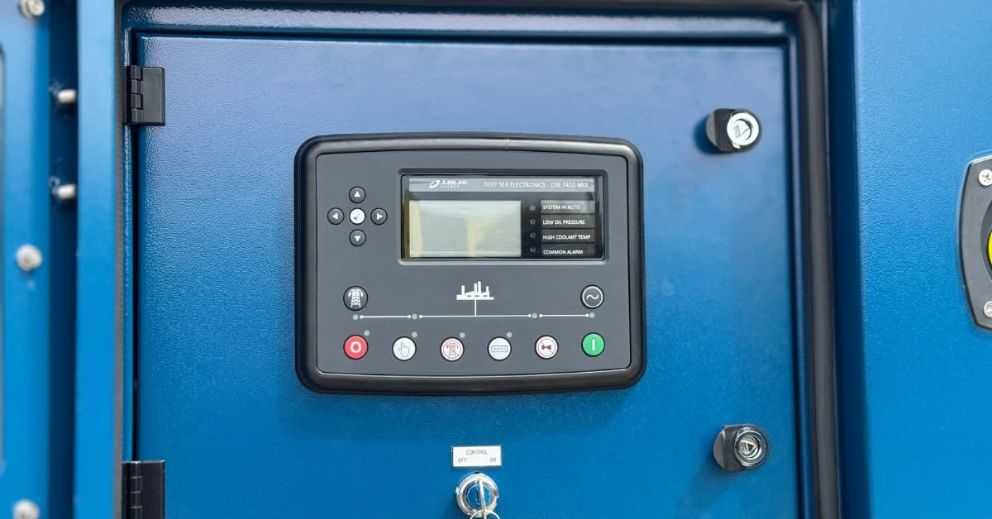
Most panels combine a few basic instruments with a set of indicator lights or a small digital screen. Some are simple analogue dials, others are fully digital with scrolling menus.
Analogue vs Digital Panels
Older or smaller generators often use analogue dials with physical needles. They're simple, reliable, and easy to read at a glance.
Newer models, especially standby and commercial units, tend to have digital displays. These can show multiple readings on rotation and often include fault codes for troubleshooting.
Common Panel Layouts
Most panels group readings into a few sections: electrical output, engine status, and alarms or warnings. Once you know where to look, checking your generator becomes a quick habit rather than a guessing game.
- Voltage and frequency meters, usually front and centre
- An hour meter tracking total run time
- Warning lights for oil pressure, temperature, and battery charge
- A start/stop or auto/manual switch
Voltage, Frequency, and Current: What the Numbers Mean
These three readings are the core of what your generator is producing, and they matter because your appliances and equipment are designed to run within specific ranges.
Voltage Readings Explained
Voltage tells you the electrical pressure your generator is supplying. In Australia, standard household voltage sits around 230 to 240 volts.
If your panel is showing readings well outside that range, it's a sign something needs attention, whether that's a loose connection, a fault in the alternator, or an overloaded circuit.
Frequency and Why 50Hz Matters
Australian generators are designed to run at 50 hertz (Hz), matching the national grid standard. This reading should stay steady while the generator is under load.
A fluctuating frequency usually points to an engine speed problem, often linked to the governor or fuel supply. It's worth getting checked rather than ignored, since unstable frequency can damage sensitive electronics.
Current (Amps) and Load Management
The amp reading shows how much current is being drawn by everything plugged in or connected to the generator. Keeping this within the rated capacity stops the unit from overheating or tripping out.
If you're running multiple appliances at once, keeping an eye on the amp reading helps you avoid overloading the generator unexpectedly.
Warning Lights and Fault Indicators You Shouldn't Ignore
Warning indicators exist to catch problems before they turn into breakdowns. Knowing what each one means gives you time to act before real damage happens.
Oil Pressure and Temperature Alerts
Low oil pressure or high engine temperature warnings should never be brushed off. These usually trigger an automatic shutdown to protect the engine, and running the generator again before checking the cause can cause serious damage.
Battery and Charging Faults
Most generators rely on a small battery to start the engine and power the control panel. A battery warning light often means the charging circuit isn't topping it up properly, which can leave you with a generator that won't start when you need it most.
Overload and Short Circuit Indicators
These lights trip when the load exceeds what the generator is rated for, or when there's a fault in the wiring. Resetting the breaker without addressing the underlying cause usually just leads to it tripping again.
- Red or amber lights generally mean stop and investigate
- Flashing lights often indicate an active fault, not just a warning
- Steady lights may simply confirm normal operation, depending on the model
Reading the Hour Meter and Planning Maintenance
The hour meter tracks total running time, and it's one of the most useful readings for staying on top of servicing. Most manufacturers base oil changes, filter replacements, and general servicing around run hours rather than calendar time.
Why Run Hours Matter More Than Age
A generator that's ten years old but rarely used might have far fewer hours on the clock than one that's three years old and used weekly for a home or business. Servicing based on hours gives a more accurate picture of engine wear.
Setting Your Own Maintenance Reminders
Jotting down the hour reading each time you use the generator, or after each service, makes it much easier to plan ahead. It also helps if you ever need to sell the unit or get it serviced by someone else who wasn't there for its history.
When Panel Readings Signal It's Time to Call a Professional
Some readings are worth monitoring yourself, but others point to issues that need proper diagnosis. Persistent voltage instability, repeated overload trips, or unexplained fault codes are all signs the generator needs a closer look from someone who works with these systems regularly.
This is particularly true for standby generators tied into a home or business's electrical system, where incorrect readings can affect connected equipment. Getting a professional assessment early is usually far cheaper than dealing with a full breakdown later, whether that's for a home backup unit or equipment supporting a small business.
Related reading
Keep Your Generator Running When You Need It Most
Understanding your generator control panel makes it easier to spot when something isn't quite right. But if you're seeing repeated fault codes, unstable readings, or warning lights that keep coming back, it's worth getting the issue checked before it turns into a bigger problem.
At Jubilee Energy, we help keep generators running safely and reliably with professional servicing, maintenance, and repairs. If you're unsure about a panel reading or your generator isn't performing as it should, get in touch with our team to book an inspection or service.
Key Takeaways
- Voltage and frequency readings show whether your generator's output matches safe operating standards
- Amp readings help you manage load and avoid overloading connected appliances
- Warning lights for oil pressure, temperature, and battery faults should always be investigated, not reset and ignored
- The hour meter is the most reliable way to schedule servicing, more accurate than relying on the generator's age
- Persistent or repeated fault readings usually mean it's time for a professional inspection rather than a DIY fix
FAQ
Why does my generator's voltage reading keep changing while it's running?
Small fluctuations are normal as load changes, like when an appliance's motor kicks in. Larger or sustained swings usually point to a loose connection, an ageing alternator, or an overloaded circuit that needs checking.
Can I keep using my generator if a warning light comes on but it's still running?
It depends on the light. Battery or minor charging alerts might not stop the unit immediately, but oil pressure and temperature warnings usually mean the engine has shut down or is about to, and continuing to run it can cause lasting damage.
How often should I actually check the control panel readings?
A quick glance every time you start the generator is enough for most home users, checking voltage, frequency, and any warning lights before connecting appliances. Commercial or standby units used more heavily benefit from more regular monitoring.
Do all generator brands use the same panel layout and symbols?
No, layouts vary quite a bit between manufacturers and models, though most cover the same basic readings. If you're ever unsure what a specific symbol or fault code means, the owner's manual or a quick call to a technician can clear it up quickly.
What should I do if the panel shows a fault code I don't recognise?
Write down the exact code or symbol before resetting anything, since that information helps a technician diagnose the issue faster. If the fault repeats after a reset, it's best to have someone assess it rather than keep restarting the unit.
More insights from us
Discover the latest in power generation technology.